


Brand Social Value (BSV) is designed to help brands understand who they are, who they serve, and how their marketing will be perceived before it goes live. This guide walks you through the full BSV workflow—from your first login to testing real marketing campaigns.
Step 1: Your Home Screen — What You See When You Log In
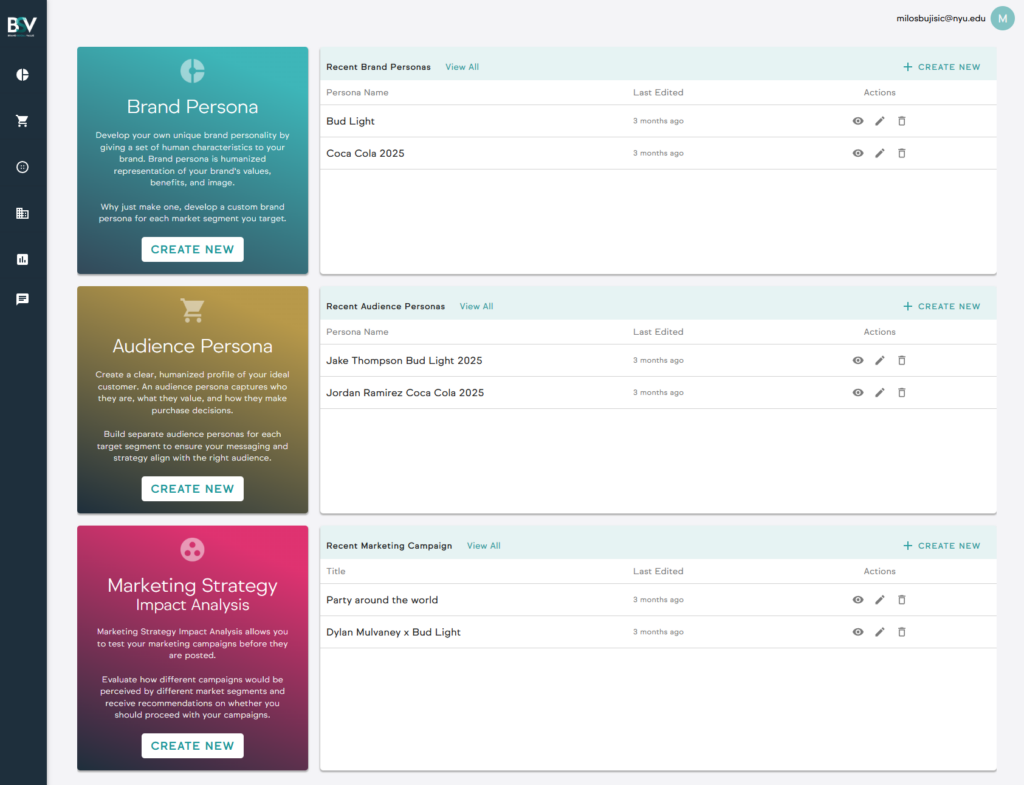
When you log into BSV, you land on the Home Dashboard. This screen gives you quick access to the three core building blocks of the platform:
1. Brand Personas
A list of all brand personas you’ve created, plus a Create New button to build a new one.
2. Audience Personas
A list of audience (ideal consumer) personas, used when real consumer data is unavailable or when you want to define your own target audience.
3. Marketing Strategy & Sentiment Analysis
A workspace where you create, analyze, and optimize marketing campaigns before publishing them.
Think of the Home Screen as your control center—everything starts here.
Step 2: Creating a Brand Persona (The Foundation of BSV)
What Is a Brand Persona in BSV?
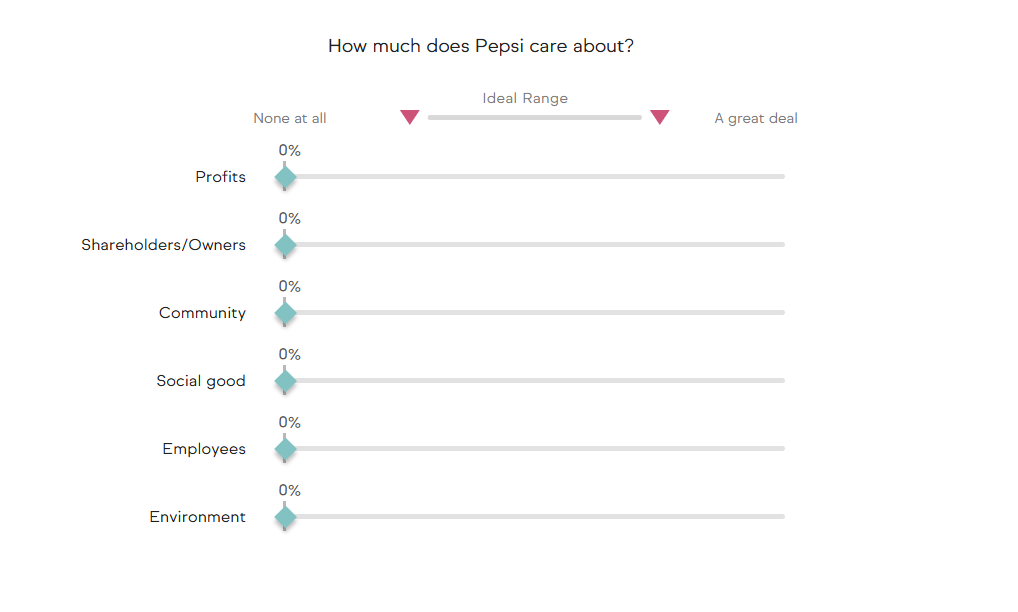
In BSV, a Brand Persona is a structured, humanized representation of how consumers perceive your brand’s:
- Social values
- Product benefits
- Priorities (profits, people, planet, community, employees, etc.)
This is not what you want your brand to be—it’s what your brand actually signals to consumers.
How to Create One
- Click Create New under Brand Persona
- Follow the guided prompts
- Choose your input method (recommended below)
- Review and refine outputs before finalizing
Input Options
BSV offers three ways to create a Brand Persona:
- AI Brand Analysis (Recommended)
Upload brand documents (e.g., guidelines, mission, strategy). The system generates a persona automatically. - AI Brand Analysis (Prompts)
Answer guided open-ended questions to build the persona with AI support. - Manual Analysis
Complete structured survey questions to define the persona quantitatively.
Use document upload when possible, then review and refine outputs for accuracy.
For example:
- If your brand prioritizes profits over environmental impact, reflect that honestly.
- If consumers do not perceive your brand as socially driven, don’t overstate it.
BSV works best when personas reflect reality, not aspiration.
Step 3: Understanding the Brand Persona Dashboard
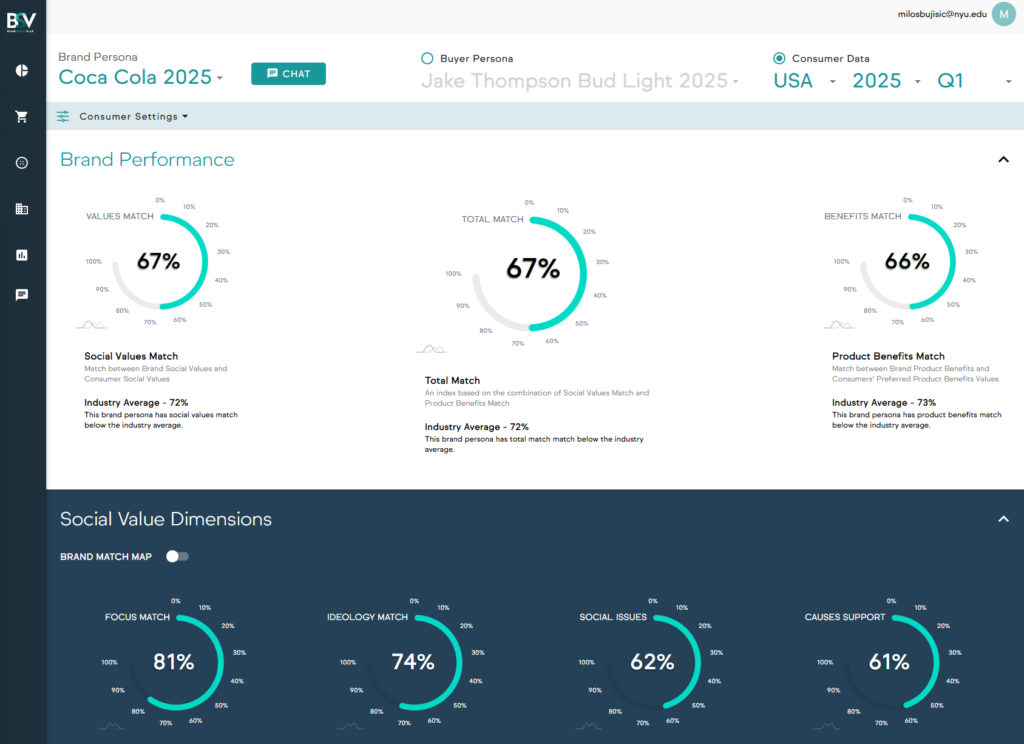
Once your Brand Persona is created, you’ll be taken to the Brand Persona Dashboard.
Key Metrics You’ll See
- Product Benefits Match
How well your product benefits align with what consumers want. - Social Values Match
How closely your brand’s social values align with consumer values. - Total Match
A combined index measuring overall alignment between your brand and consumers.
By default, these scores are calculated for:
- USA
- Nationally representative sample
- Consumers 18+
Going Deeper
Scroll down to explore:
- Where your brand performs strongly
- Where mismatches occur
- How your brand compares to well-known brands in similar industries
This helps you see exactly where alignment is strong—and where risk exists.
Step 4: Changing Markets & Target Segments
Brands don’t speak to everyone the same way.
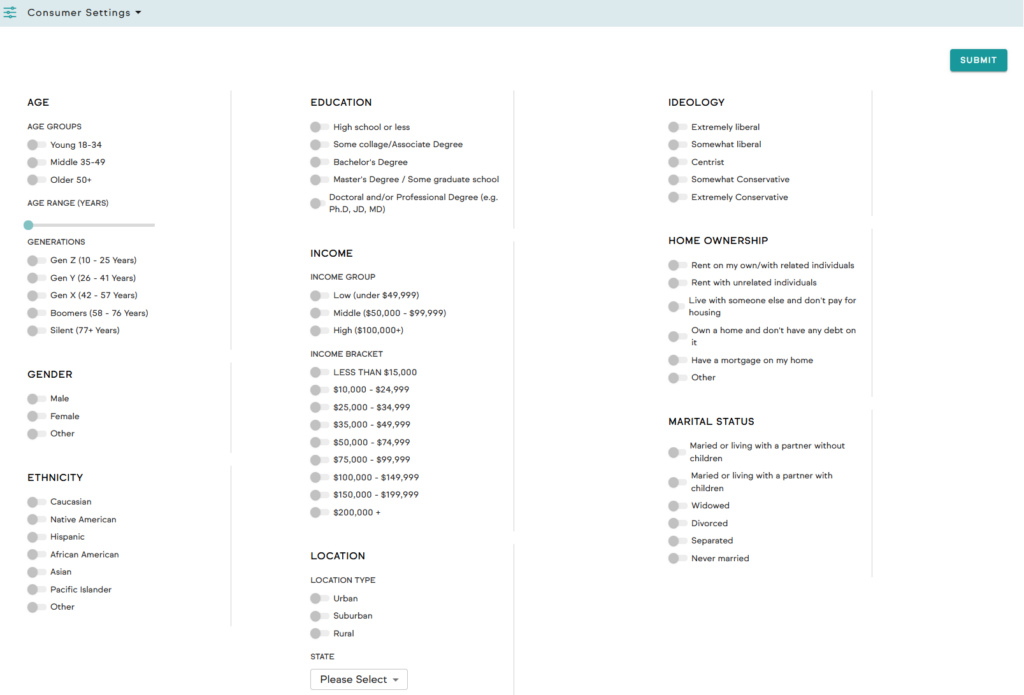
At any time, you can:
- Change countries
- Filter by age, income, education, ideology, gender, location, and more
Simply open Consumer Settings and adjust your target audience.
All scores instantly update based on the selected segment—allowing you to test how your brand performs across different markets and demographics.
Step 5: Chat With Your Brand Persona (AI Brand Agent)
Each Brand Persona comes with a custom AI agent.
This agent:
- Speaks as your brand persona
- Reflects your values, tone, and priorities
- Helps you explore messaging, positioning, and trade-offs
You can use it to:
- Test ideas
- Ask how the brand would respond to issues
- Explore strategic decisions from the brand’s point of view
Step 6: Comparing Brand Personas With Audience Personas
You can also compare your Brand Persona against Audience Personas to see how well they align.
This is especially useful when:
- You want to see if your brand resonates with a specific ideal customer
- You’re targeting different audiences with different messaging
Step 7: Creating Audience Personas (When You Don’t Have Consumer Data)
What Is a Audience Persona?
An Audience Persona represents an ideal or hypothetical consumer you define yourself.
Use Audience Personas when:
- You don’t have access to real consumer data
- You want to model a very specific target audience
- You’re testing early-stage ideas
From the Home Screen:
- Click Create New Audience Persona
- Define demographics, values, and preferences
- Use it later to test brand fit and campaign impact
Step 8: Creating a Marketing Campaign Strategy
Now you’re ready to test real marketing ideas.
How to Start
From the Home Screen:
- Click Create New Marketing Strategy
- Select:
- Which Brand Persona the campaign is for
- What type of campaign you’re creating (e.g., PR, influencer, event, ad)
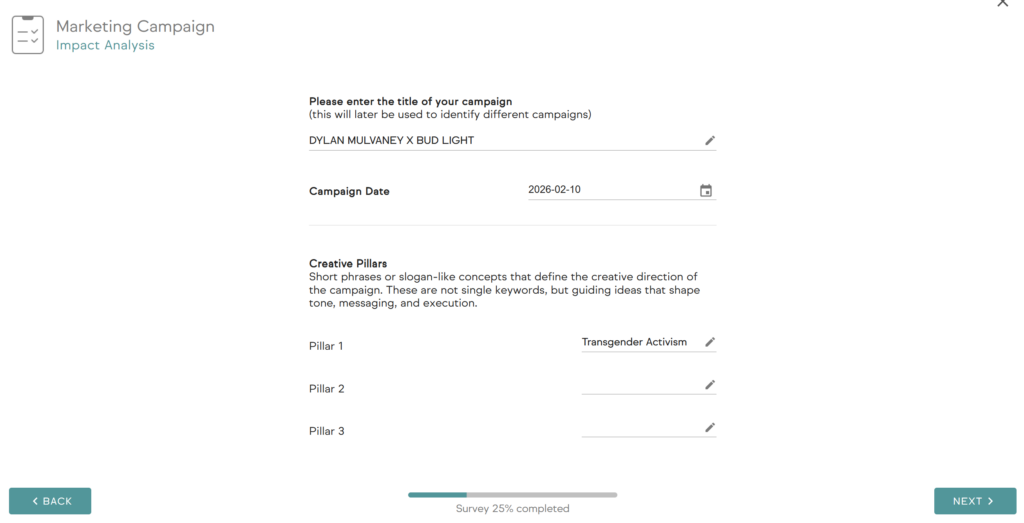
Campaign Title & Creative Pillars
You’ll be asked to enter:
- A campaign title
- Up to three creative pillars
These pillars are not just tags—they are short phrases or slogan-like concepts that define the creative direction of the campaign. These are not single keywords, but key ideas, themes, and concepts that guide AI analysis.
The more descriptive, informative, and creative your title and pillars, the stronger the analysis and strategy output will be.
Campaign Brief (Optional Step)
After defining your Brand Persona pillars, you can add a Campaign Brief.
A Campaign Brief outlines the key strategic inputs for a marketing campaign. It typically includes:
- Objective (what the campaign should achieve)
- Target audience
- Budget and constraints
- Key customer insights
- Messaging direction or tone
Input options:
- Upload a campaign brief document
- Answer guided questions to generate the brief
- Skip this step entirely
Adding a brief improves the accuracy and relevance of campaign simulations and recommendations.
Step 9: Campaign Pitch — AI or Your Own
Next, you can choose between:
AI-generated campaign pitch
Created using your brand persona, consumer preferences, title, and keywords.
You can regenerate and refine the pitch by specifying what should be changed, such as:
- Core message
- Tone and style
- Audience relevance
- Brand fit
- Originality
- CTA
- Execution concept
Upload your campaign pitch
Upload an existing campaign concept or brief document.
Your own campaign pitch
Written by your team and entered directly into the platform.
All options integrate with BSV’s analysis engine.
Step 10: Analyzing Campaign Impact
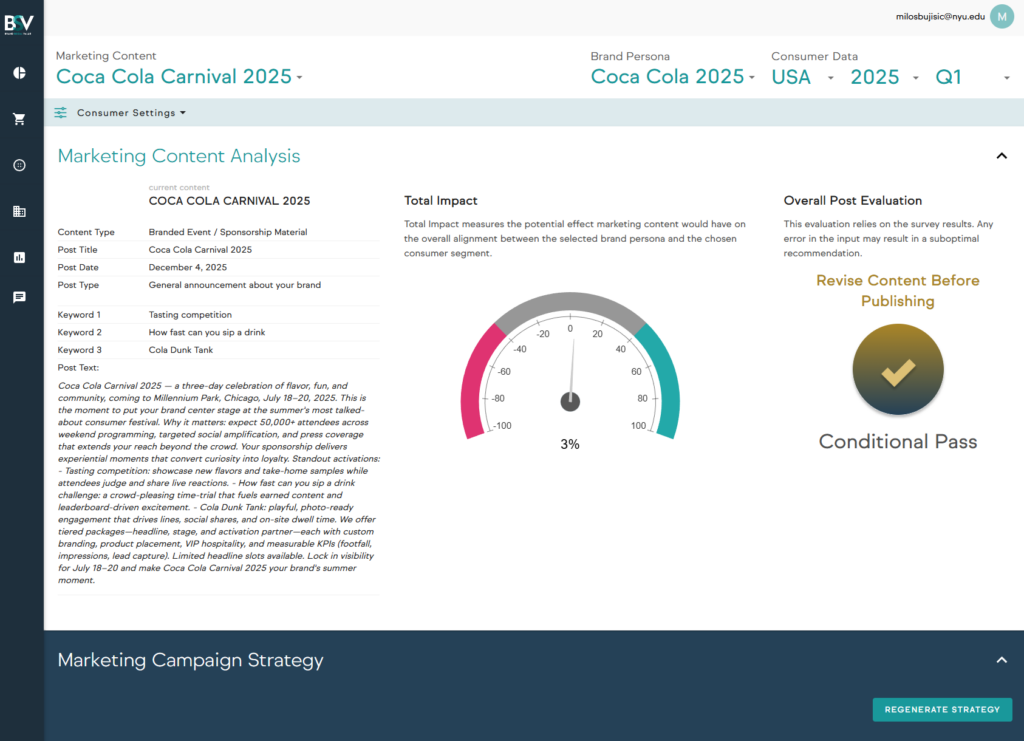
Once submitted, you’re taken to the Marketing Campaign Dashboard.
Total Impact Score Explained
Total Impact measures the potential effect your marketing content would have on overall alignment between:
- The selected brand persona
- The chosen consumer segment
How to Read the Scores
- 20%+ (Star)
Exceptional alignment and impact. Strong recommendation to publish. - 15–19% (Very Strong)
Performs well in most situations. Safe to implement. - 10–14% (Solid)
Generally effective, but improvements can increase impact. - 0–9% (Filler)
Not bad, but not strong enough. Revise before publishing. - –1% to –10% (Weak)
Likely underperforms. Do not publish without major changes. - Below –10% (High Risk)
Poor alignment and potential backlash. Avoid publishing.
Step 11: Diagnosing Issues & Optimizing Strategy
Scroll further down the dashboard to see:
- Where the campaign misaligns with brand identity
- Where it clashes with consumer preferences
- Which values or benefits are over- or under-emphasized
You’ll also see a full Marketing Campaign Strategy, including:
- Clear creative guidelines
- Strategic recommendations
- Suggested changes and optimizations
You can regenerate and refine the strategy by specifying what should be changed, such as:
- Objective
- Target Audience
- Customer Insight
- Messaging Guardrails
- Campaign Approach / Strategic Execution
- Revised Copy
- Budget & Allocation
- Timeline & Execution Plan
This turns BSV from an evaluation tool into a decision-making and optimization engine.
Step 12: Mood Board, Video Generation, and Export
You can create a Mood Board, which is a visual representation of your campaign’s look and feel. It combines images, styles, colors, and references to guide creative direction and ensure consistency.
If you are developing video-based content (e.g., TV ad, YouTube, TikTok, Instagram), you can also generate a video based on your strategy and inputs. The video can be regenerated and modified by adjusting key elements to better fit your objectives and brand.
Finally, you can export results to PDF, including:
- Dashboard insights
- Marketing campaign strategy
- Mood board
This allows you to package outputs for presentation, sharing, or internal decision-making.
Step 13: Exploring Consumer & Brand Databases
From the left-hand menu, you can also access:
Consumer Dashboard
Explore different consumer segments in depth to better understand:
- Values
- Preferences
- Demographic differences
Brand Database
Explore personas of well-known brands, see how they perform across markets, and benchmark your brand against industry leaders.
Final Thought
BSV is designed to help brands:
- Understand themselves clearly
- Align with the right audiences
- Avoid costly marketing mistakes
- Build strategies grounded in real consumer perception
By following this workflow, you move from intuition to evidence-based brand and marketing decisions—before anything goes live.
Leave a Reply
You must be logged in to post a comment.